
Discord Rich Presence Plugin for Navidrome


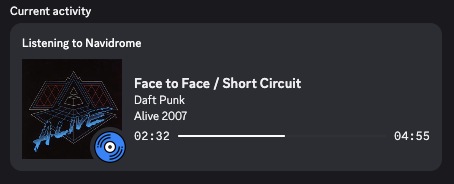
This plugin integrates Navidrome with Discord Rich Presence, displaying your currently playing track in your Discord status. The goal is to demonstrate the capabilities of Navidrome's plugin system by implementing a real-time presence feature using Discord's Gateway API. It demonstrates how a Navidrome plugin can maintain real-time connections to external services while remaining completely stateless.
Based on the Navicord project.
⚠️ WARNING: This plugin requires storing Discord user tokens, which may violate Discord's Terms of Service. Use at your own risk.
Features
- Shows currently playing track with title, artist, and album art
- Displays playback progress with start/end timestamps
- Automatic presence clearing when track finishes
- Multi-user support with individual Discord tokens
- Optional image hosting via uguu.se for non-public Navidrome instances
Installation
- Copy the
discord-rich-presence.ndpfile from the releases page to your Navidrome plugins folder (default isplugins/under the Navidrome data directory). - Configure the plugin in Settings > Plugins > Discord Rich Presence
- Enable the plugin
Important: Remember to configure your account in Discord to share activity status with others:
- Go to User Settings > Activity Privacy
- Enable Share my activity
There is no need to restart Navidrome; Check the logs for any errors during initialization.
Note: Currently album art can only be displayed if your Navidrome instance is public. Additionally you must set the ND_BASEURL config to your public facing URL. Once this is complete you will need to restart Navidrome for the change to take effect.
How It Works
Plugin Capabilities
The plugin implements three Navidrome capabilities:
| Capability | Purpose |
|---|---|
| Scrobbler | Receives NowPlaying events when users start playing tracks |
| WebSocketCallback | Handles incoming Discord gateway messages (heartbeat ACKs, sequence numbers) |
| SchedulerCallback | Processes scheduled events for heartbeats and presence clearing |
Host Services
| Service | Usage |
|---|---|
| HTTP | Discord API calls (gateway discovery, external assets registration) |
| WebSocket | Persistent connection to Discord gateway |
| Cache | Sequence numbers, processed image URLs |
| Scheduler | Recurring heartbeats, one-time presence clearing |
| Artwork | Track artwork public URL resolution |
| SubsonicAPI | Fetches track artwork data for image hosting upload |
Flow
- Track starts playing - Navidrome calls
NowPlaying - Plugin connects - If not already connected, establishes WebSocket to Discord gateway
- Authentication - Sends identify payload with user's Discord token
- Presence update - Sends activity with track info and processed artwork URL
- Heartbeat loop - Recurring scheduler sends heartbeats every 41 seconds to keep connection alive
- Track ends - One-time scheduler callback clears presence and disconnects
Stateless Design
Navidrome plugins are stateless - each call creates a fresh instance. This plugin handles that by:
- WebSocket connections: Managed by host, keyed by username
- Sequence numbers: Stored in cache for heartbeat messages
- Configuration: Reloaded on every method call
- Artwork URLs: Cached after processing through Discord's external assets API
Image Processing
Discord requires images to be registered via their external assets API. The plugin:
- Fetches track artwork URL from Navidrome
- Registers it with Discord's API to get an
mp:prefixed URL - Caches the result (4 hours for track art, 48 hours for default image)
- Falls back to a default image if artwork is unavailable
For non-public Navidrome instances: If your server isn't publicly accessible (e.g., behind a VPN or firewall), enable the "Upload to uguu.se" option. This uploads artwork to a temporary file host so Discord can display it.
Files
| File | Description |
|---|---|
| main.go | Plugin entry point, scrobbler and scheduler implementations |
| rpc.go | Discord gateway communication, WebSocket handling, activity management |
| coverart.go | Artwork URL handling and optional uguu.se image hosting |
| manifest.json | Plugin metadata and permission declarations |
| Makefile | Build automation |
Configuration
Configure via the Navidrome UI under Settings > Plugins > Discord Rich Presence:
| Field | Description |
|---|---|
| Client ID | Your Discord Application ID (create at Discord Developer Portal) |
| Upload to uguu.se | Enable if your Navidrome instance isn't publicly accessible (uploads artwork to temporary file host) |
| Users | Array of username/token pairs mapping Navidrome users to Discord tokens |
Building
Although the plugin can be compiled to WebAssembly with standard Go, it is recommended to use TinyGo for smaller binary size.
# Run tests
make test

# Build plugin.wasm
make build

# Create distributable plugin package
make package
The make package command creates discord-rich-presence.ndp containing the compiled WebAssembly module and manifest.
Manual build:
tinygo build -target wasip1 -buildmode=c-shared -o plugin.wasm -scheduler=none .
zip discord-rich-presence.ndp plugin.wasm manifest.json
Using standard Go:
GOOS=wasip1 GOARCH=wasm go build -buildmode=c-shared -o plugin.wasm .
zip discord-rich-presence.ndp plugin.wasm manifest.json